
Plume主题增强之博客页面布局调整
介绍
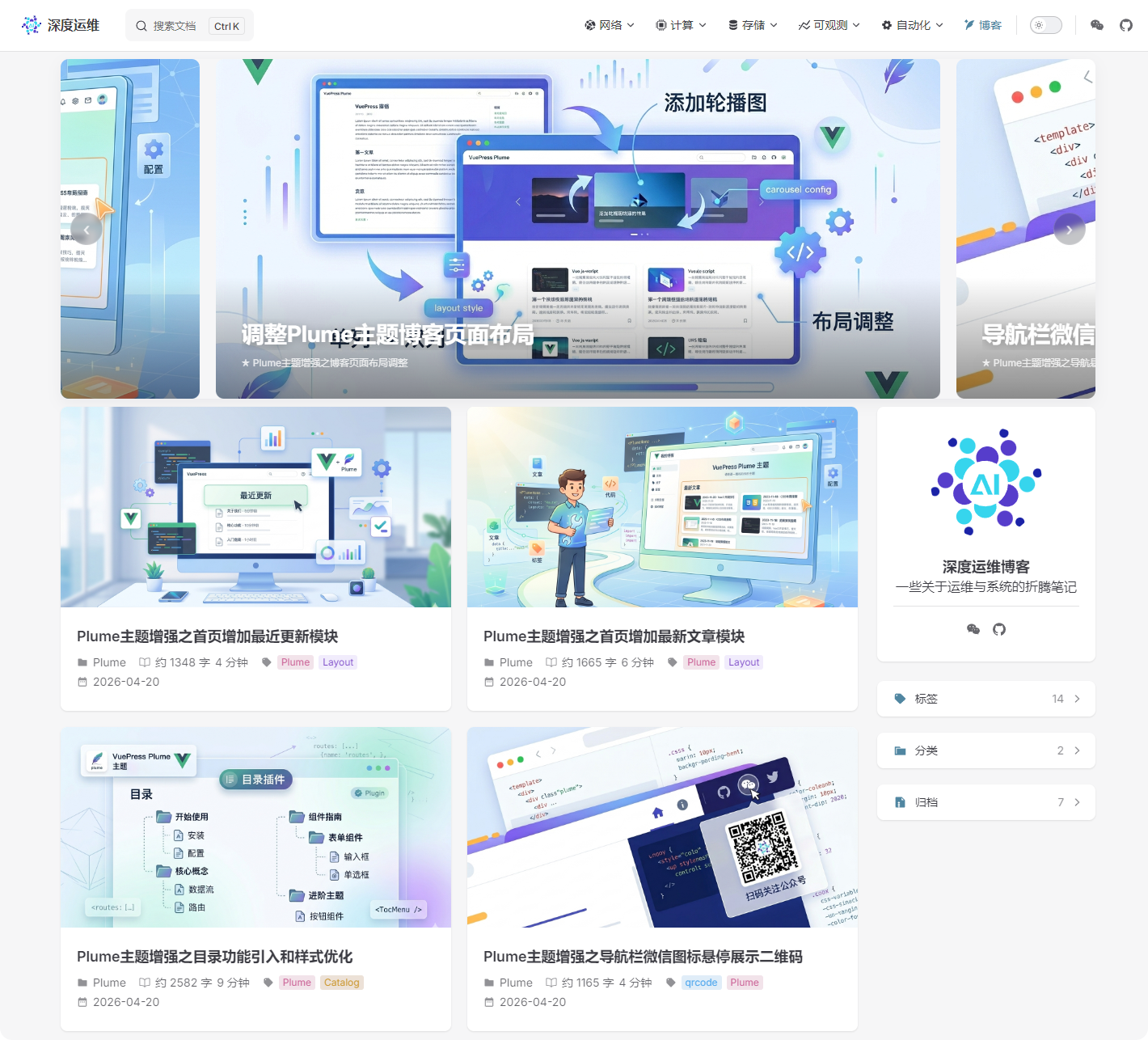
在 Plume 主题的博客文章列表页进行以下三项增强:
- 双列布局:将默认的单列文章列表改为双列网格,移动端自动回退为单列
- 封面可点击:为文章封面图添加点击跳转功能,点击封面即可进入文章
- 顶部轮播图:在文章列表上方插入一个可自动播放的图片轮播组件
- 桌面端:中间卡片居中,左右露出相邻卡片一部分(宽度占 70%)
- 平板端:全宽单张轮播(高度 380px)
- 移动端:全宽单张轮播(高度 200px)
- 支持自动播放、手动前后切换、底部指示点、幻灯片描述文字
效果预览
项目结构总览
docs/
└── .vuepress/
    ├── components/
    │   ├── BlogCarousel.vue   ← 新增:博客轮播图组件
    │   └── BlogEnhance.vue    ← 新增:博客双列布局 + 封面点击组件
└── client.ts ← 修改:注册以上两个组件| 文件 | 操作 | 说明 |
|---|---|---|
docs/.vuepress/components/BlogCarousel.vue | 新增 | 轮播图组件,包含逻辑与样式 |
docs/.vuepress/components/BlogEnhance.vue | 新增 | 双列布局与封面点击增强,包含逻辑与样式 |
docs/.vuepress/client.ts | 修改 | 通过 posts-top 插槽插入轮播图,通过 rootComponents 注册布局增强 |
实现过程
BlogCarousel — 无限循环轮播
轮播的核心难点在于「无缝循环」:从最后一张滑到第一张时,视觉上不能有跳帧。这里采用克隆首尾的方案解决:
// loopImages = [最后一张克隆, 原始第1张, 原始第2张, ..., 第一张克隆]
const loopImages = computed(() => {
  if (N === 0) return []
  return [images[N - 1], ...images, images[0]]
})
初始 currentIndex = 1,即显示第一张真实图片。当用户连续点击「下一张」滑到克隆的第一张(index = N+1)时,transitionend 回调检测到越界,立刻关闭动画并跳回真实位置,再重新开启动画,用户完全感知不到跳转:
function onTransitionEnd(e) {
  if (e.target !== inner.value) return
  if (currentIndex.value >= N + 1) {
    animated.value = false       // 1. 关闭 CSS transition
    currentIndex.value = 1       // 2. 无动画跳回真实第一张
    nextTick(() => {
      void inner.value?.offsetHeight  // 3. 强制浏览器回流,确保位置已应用
      animated.value = true      // 4. 重新开启动画
      locked.value = false
    })
  }
  // ... 反向同理
}
为什么不用 CSS class 切换动画?
因为 Vue 的响应式更新是异步的,class 变更和位置变更可能在同一帧内被合并,导致动画不触发。用 inline style 直接控制
transition属性可以精确掌握时序。
桌面端居中定位的计算逻辑:每张幻灯片宽度为容器的 70%,间距 20px,当前卡片始终在视觉中央:
const innerStyle = computed(() => {
  const slideWidth = w * 0.7
  const gap = 20
  const step = slideWidth + gap          // 每步移动的像素
  const centerOffset = (w - slideWidth) / 2  // 居中所需的偏移
  const tx = currentIndex.value * step - centerOffset
  return { transform: `translateX(-${tx}px)` }
})宽度同步通过 ResizeObserver 监听 .posts-container 容器实现。博客列表页没有 .vp-doc 节点,轮播图宽度需要跟随文章列表容器而非页面宽度:
function syncWidth() {
  const container = document.querySelector('.posts-container') || ...
  if (container) {
    const rect = container.getBoundingClientRect()
    if (rect.width > 0) {
      wrap.value.style.maxWidth = rect.width + 'px'
      wrapperWidth.value = rect.width
    }
  }
}
BlogEnhance — 双列布局与封面点击
双列布局通过全局 CSS 覆盖 Plume 默认样式实现。Plume 主题的文章列表容器有多层宽度限制,需要逐层打穿:
/* 核心:将列表改为两列 Grid */
.vp-post-list {
  display: grid !important;
  grid-template-columns: repeat(2, 1fr) !important;
  gap: 20px !important;
  max-width: 100% !important;
}

/* 打穿多层容器宽度限制 */
#VPContent .vp-blog-page .vp-doc,
#VPContent .vp-blog-posts .vp-doc {
  max-width: 100% !important;
  padding: 0 !important;
}封面点击不能直接给封面加 <a> 标签(HTML 结构由 Plume 控制),因此改用 JS 动态绑定。使用 MutationObserver 是因为博客列表是 SPA 路由跳转渲染的,组件挂载时 DOM 不一定已经准备好:
const attachCoverLinks = () => {
  const items = document.querySelectorAll('.vp-post-item')
  items.forEach((el) => {
    if (el.dataset.coverLinked === '1') return  // 避免重复绑定
    const anchor = el.querySelector('a[href]')   // 取文章标题链接
    const cover = el.querySelector('.post-cover')
    if (anchor && cover) {
      cover.style.cursor = 'pointer'
      cover.addEventListener('click', (e) => {
        // Ctrl/Meta/Shift 点击交给浏览器默认行为(新标签页打开)
        if (e.ctrlKey || e.metaKey || e.shiftKey || e.button === 1) return
        window.location.href = anchor.getAttribute('href')
      })
      el.dataset.coverLinked = '1'  // 标记已绑定,防止重复处理
    }
  })
}

// MutationObserver 监听 DOM 新增,处理路由切换后重新渲染的情况
mo = new MutationObserver(attachCoverLinks)
mo.observe(document.body, { childList: true, subtree: true })
使用方法
第一步:新增组件文件
将以下两个文件分别创建到 docs/.vuepress/components/ 目录下:
第二步:配置轮播图内容
打开 BlogCarousel.vue,修改 <script setup> 中的 images 数组:
const images = [
  {
    src: '/cover/your-image.png',    // 图片路径(相对于 docs/public/)
    link: '/blog/your-post/',         // 点击跳转链接
    caption: '文章标题',              // 右下角标签文字
    description: '文章简介'           // 左下角大标题文字
  },
  // ... 更多条目
]
第三步:修改 client.ts
在 docs/.vuepress/client.ts 中添加以下配置:
import { defineClientConfig } from 'vuepress/client'
import { h } from 'vue'
import { Layout } from 'vuepress-theme-plume/client'
import BlogCarousel from './components/BlogCarousel.vue'
import BlogEnhance from './components/BlogEnhance.vue'

export default defineClientConfig({
  layouts: {
    Layout: () =>
      h(Layout, null, {
        'posts-top': () => h(BlogCarousel),
      }),
  },
  rootComponents: [BlogEnhance],
})